Laptop computer recommendations?

Status
Not open for further replies.

sw_ross

Senior Member
Location
NoDak
I'm researching upgrading my existing laptop.
I want something that I can use for business (Quickbooks, Word documents, estimating software, PDF's, etc)
I also currently have a iPad mini, and an iPhone.
Not set on an apple product, just something functional and cost effective.

Any recommendations are appreciated!
Sky
 
Are there apps you use, or want to use, that only work on Mac or on Windoze?

What do you have now? Are you otherwise happy with it? (If you're using a Mac now, might just get a newer one.)

For windoze, I'm a fan of the ThinkPad commercial series, they've worked well for me (the 17 year old T-21 still boots :D). Since it's for business, invest in good tools- don't get a stripped-down/cheap consumer-grade laptop, they don't last and aren't supported as well.
 
I currently have a 10 year old dell 15". It's worked well for personal use, haven't done business type stuff on it. Was contemplating having it cleaned up and software upgraded. Was trying to weigh out that option vs just buying a new one.
I want a computer that I can start doing estimates and bookkeeping stuff on.
I don't have a specific budget, just researching the pros and cons of the different options.
 
I currently have a 10 year old dell 15". It's worked well for personal use, haven't done business type stuff on it. Was contemplating having it cleaned up and software upgraded. Was trying to weigh out that option vs just buying a new one.
I want a computer that I can start doing estimates and bookkeeping stuff on.
I don't have a specific budget, just researching the pros and cons of the different options.

i've got a surface pro, for windows apps i have to run,
and everything else is on ios and osx.

the surface pro works well.
windows sucks.

macbook pro works well.
OSX works well.

apple costs a fair bit more.
imho, it works a fair bit better.
 
Apple laptops make great Windows machines. Run Boot Camp with Windows 10. Best of both worlds. :thumbsup:
 
Lenovo Think Pad or at lest an Idea pad.
They take a beating in the worst environments without the clunky rouged use others had.
Afghanistan they used tons of Lenovos. From cold weather to desert hot. Continuous dust and sand.
Tossed around in bags. Knocked on the ground.
One of mine even took a few thousand pound bomb blast, enough to take out surrounding walls and bend nearby steel.
No problems. Still typing on it now.

Watch new laptops can come stripped down with no optic drive, few ports, a tiny hard drive, and little memory. Made to surf the net.
 
My wife wanted a laptop. Figured anything today would be faster than my older Dell even though I upgraded to a SSD a couple years ago. Not so. I bought her a POS burdened with software no one wants, a slow processor and a screen to small for me to see. It is a touch screen. Whoopy wow. Don't get a
 
Lenovo or Dell. IMO stay away from HP.

The exact model depends on what you need BUT, you will be on windows 10 and will probably want at least 12 GB of RAM and a 1 TB hard drive.

Give serious consideration to a solid state drive as they save battery life and usually are faster than a regular hard drive. But they cost a lot more.
 
Lenovo or Dell. IMO stay away from HP.

The exact model depends on what you need BUT, you will be on windows 10 and will probably want at least 12 GB of RAM and a 1 TB hard drive.

Give serious consideration to a solid state drive as they save battery life and usually are faster than a regular hard drive. But they cost a lot more.

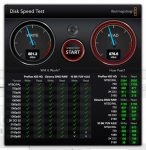
i had a macbook pro i put a fast SSD in..... and was suitably impressed....
and then i ended up getting a macbook pro with the SSD piped right into
the architecture, instead of having to run thru a buss... holy cow.

it was faster when it was almost empty, it's 95% full now.

2017-04-15_22-02-27.jpg


a +11 on the SSD, no matter what platform you end up running on.

i'm lookin at the new macbook pro with the 2 TB SSD.... maybe in
six months or so.... i've got about 65 gig left on 1 TB on this one.
 
Good info! Thanks!- now where to shop?!

Good info! Thanks!- now where to shop?!

Wow! I'm always impressed with the info I get from you guys! Thanks!
You've all given good info with plenty to think about and do comparison shopping!

Now I need to go online and compare how much, and what you get for your $$'s!
I usually buy stuff through Amazon. I like looking through the ratings/reviews.
I'm assuming I'll get something with Windows 10. I need to see if there's advantages to purchasing Office at the same time?

Where do you guys do your comparison shopping/purchasing/software, etc
Thanks!
 
The problem I had with one I bought for my wife was I did not take the time to research the particular model. I'm sure they have better, or at least hope so.

My last two laptops have been Dell with the biggest downfall being the displays almost impossible to see in daylight. The update to SSD drive, more memory, and 64 bit system made th newer very usable. Other than Windows hanging up every now and then.
 
One of my friends repairs semi-trucks and has various programs to go on line for parts, diagrams, etc. He bought a laptop with Win10, and it won't run any of those programs. He still has to bring in his desktop if he wants access to those services.
Not saying he can't run his programs, but I have occasionally tried some programs I used when I still had Win 98 and they still work on Win 10. I think bigger problems are hardware drivers for older equipment at times.
 
I'm researching upgrading my existing laptop.
I want something that I can use for business (Quickbooks, Word documents, estimating software, PDF's, etc)
I also currently have a iPad mini, and an iPhone.
Not set on an apple product, just something functional and cost effective.

Any recommendations are appreciated!
Sky
The items you mentioned so far can easily be handled by a $200-$300 dollar computer you can buy at Wal Mart.
Upgrade memory of such units to it's maximum ability and they might run even better, or at least you can run multiple things at one time a little easier.
 
Not saying he can't run his programs, but I have occasionally tried some programs I used when I still had Win 98 and they still work on Win 10. I think bigger problems are hardware drivers for older equipment at times.

That happens with Windows is you can have some backwards compatibility problems.
XP was a good platform.
Load a fresh copy of XP on a PC and go on the internet.
The pop-ups, spyware, and malware will have such a field day you wont be able to finish getting it set up.
All the updates are not available from MS anymore.
You can still find them from the same places that give your PC a virus.
The drivers for newer peripherals may not be available for XP.
Many things now are plug and play.
Plug it in and it loads the drivers for Win 7-10.
You have to manually load the correct drivers and disable the auto load feature.
Win 7-10 can be run as XP in an emulator.
But then nothing works in XP as you don't have the correct drivers.
Remember XP was set up to dial up to get internet.

For software pay attention to if it's a subscription or owned. If you have a copy or always need the internet to run the software (the actual software is in a cloud). I prefer it on the PC so it can work without internet for travels and is more responsive IMO. Watch out for PC's that are pre-loaded with software like MS office. Many computers are loaded with the software, but you don't own it, and it wont work. Until you log in and pay for the software. At best an ad on you computer to use a certain software, at worst deceptive marketing.

Myself I like a computer striped down as possible. Then I decide what I purchase and install on the PC.
Such as does it come with the version of Quick books you want, say Quick Books Contractor.
Or which version of MS Office do you get. Lots of versions out there with different features and user rights.
Such as do you want to use a student version for business.

Another thing to watch out for if you purchase in the store. I almost bought 1 pc that had less memory listed on the box sticker than the display model. Told em I didn't want that one. They grabbed another box, same model and upc number, with more memory.

I had a Dell laptop. Lasted 2 weeks. Dell replaced it in 2 weeks after mailing in the first. Kinda plasticy IMO.
Also had an HP, but it was so long ago you can't compare cause that thing was made out of stone.

 
Status
Not open for further replies.
Top